

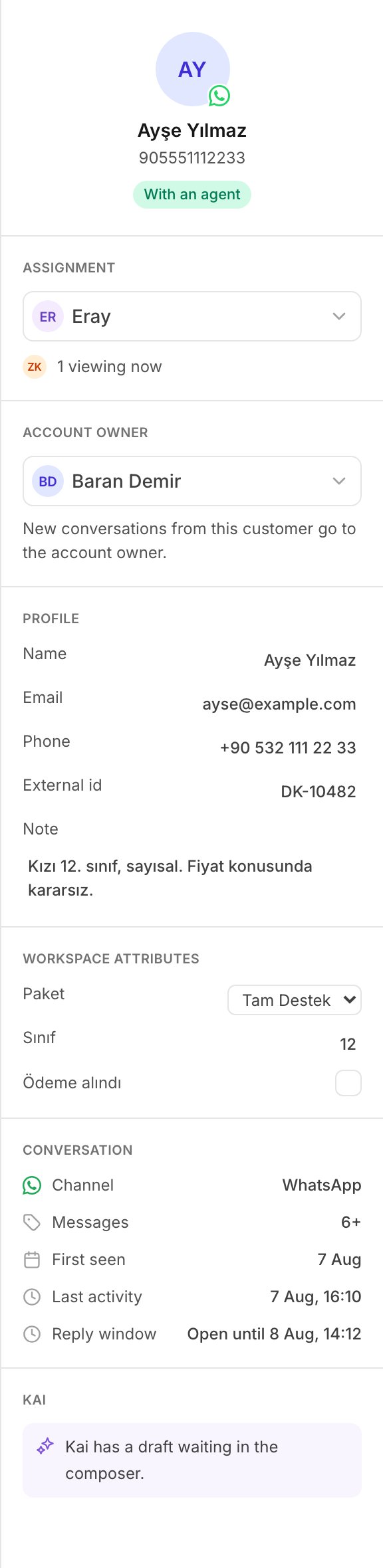
The contact record beside a conversation: account owner, profile, and workspace attributes.
Where a contact comes from
There are two sources, and they write the same records. A customer writes to you. Kai makes a contact the first time a conversation arrives from a person it does not know. The contact holds the channel handle as an identity, and the name the channel reported. The conversation links to it. You push a contact. Your CRM, your billing system or a spreadsheet writes it through the Contacts API. See Contacts. A customer who writes to you after you pushed their phone number lands on the contact you pushed. The record is one record.The Contacts screen
The list carries a search box and three filters.
Select a contact to open its record on the right. Select Load more at the
end of a long list.
Until the first message arrives, the list says: No contacts yet. They arrive
with the first message, or through the API.
The contact record
The record has four parts.Account owner
The teammate who owns this customer. See below.Profile
Name, Email, Phone, External id and Note. Every value is edited in place. Select it, type, then pressEnter or leave
the box. There is no save button, because a rep updates one detail in the
middle of a conversation.
The note is free text for teammates. Kai does not send it to a customer, and
does not give it to the model that writes replies.
Workspace attributes
Your own data on the customer: the package they bought, their exam year, their plan. See Attributes below.Conversations
Every conversation of this customer, with its last activity. Select one to open it in the inbox.An Agent may read and edit a contact, because the person who talks to a
customer is the person who learns their details. Only an Admin or a Manager
sets the account owner: that decision routes work between teammates. A
teammate without the permission sees You can read contacts but not change
them.
Identities
An identity is one handle of one customer: an email address, a phone number, an id from your own system, a contact id from the channel. Kai stores identities normalized, so the same person written two ways is one person:- an email address is lower cased;
- a phone number keeps its digits only, and loses a leading
00.
905321112233 and a CRM’s +90 532 111 22 33 are therefore the
same identity.
See Identity for the API side.
Workspace attributes
An attribute has two halves: a definition, and a value. The definition is the vocabulary of your workspace. It lives in Settings, under Attributes: a key, a name and a type. Add one there, and your team can fill it without a change to Kai. The value sits on the contact. Three rules:- Kai refuses a key that the workspace does not define. A push of 3000 rows must not silently drop the one attribute you cared about.
- The type of a definition never changes. Make a new attribute instead.
- Delete means archive. An archived attribute keeps every value it holds, and nobody can edit it after that.
The account owner
The account owner is the teammate who owns a customer. One contact has one owner, or none. The owner does two things:- Kai shows the owner on the contact record and beside the conversation, so every teammate knows who holds the relationship.
- Kai assigns a new conversation from that customer to the owner. The record says so: New conversations from this customer go to the account owner.
Ownership routes new work only
Kai assigns a conversation one time, while the conversation is still unassigned. This is what keeps ownership safe. It never takes a thread back from the teammate a manager gave it to, and it never moves work that somebody is already doing. Two things are worth knowing:- If you change the owner from the contact record, the open conversations of that customer move to the new owner. You made that decision on purpose, on one customer.
- If the owner leaves the workspace, the contact loses its owner, and new conversations go to the shared queue. Kai does not hold a conversation for a person who left.
Through the Contacts API the default is the opposite: an ownership write
does not move open conversations unless it asks to. A nightly sync that
restates 4000 unchanged owners must not reassign the whole inbox every
night. See Account owners.
Next
The inbox
Assignment, the details panel, and the reply window.
Contacts API
Push, update, assign and export the same records.