> ## Documentation Index
> Fetch the complete documentation index at: https://docs.kaisupport.com/llms.txt
> Use this file to discover all available pages before exploring further.
# The knowledge base
> What a Brain holds, what each of the six categories controls, and what the four review states mean.
The knowledge base is the Brain. It is everything Kai is allowed to know and
say. Kai writes the first version of it from the chat history you upload. Your
team then reads it, changes it, and decides what Kai may use.
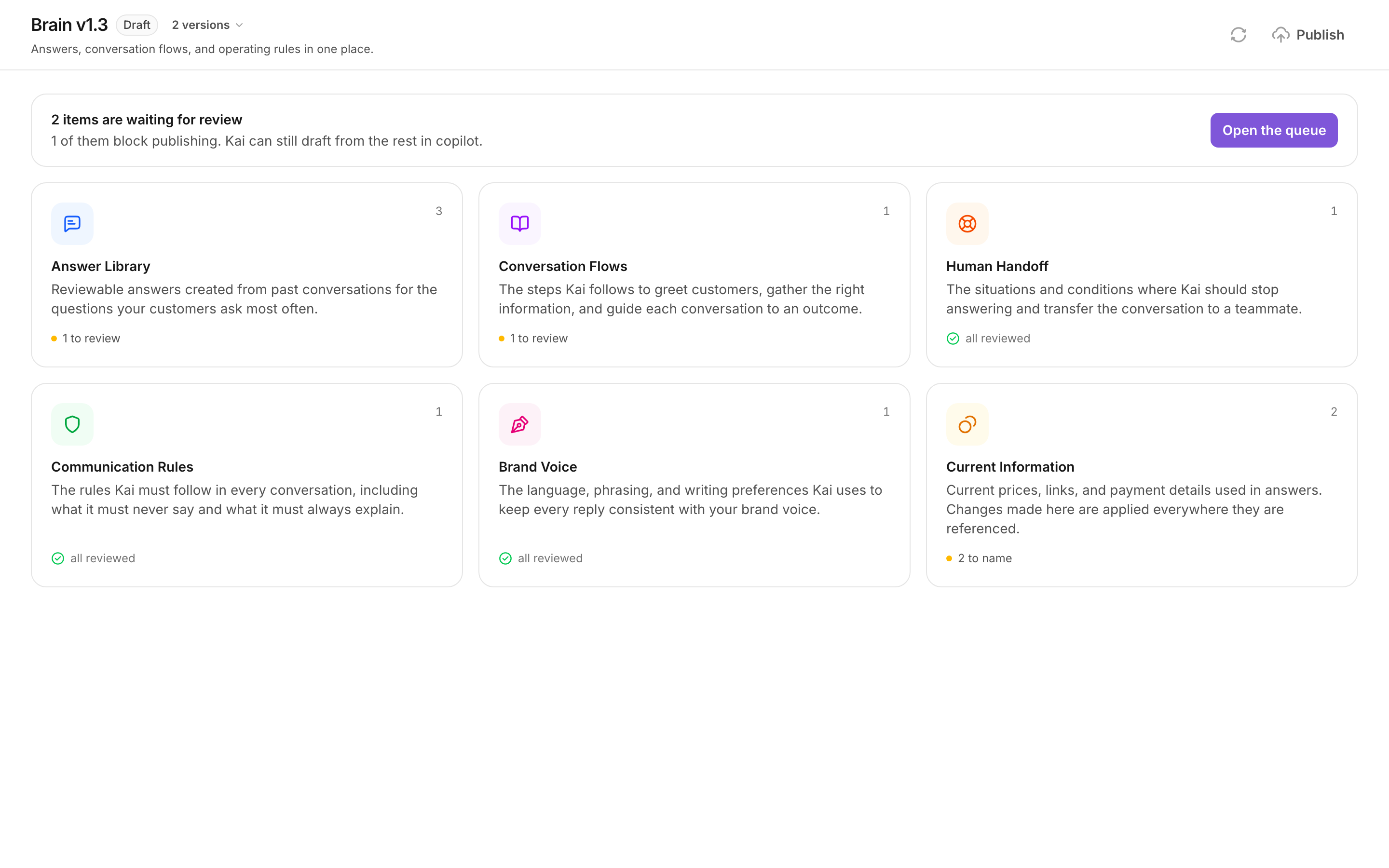
Open it from **Brain** in the left navigation. The page shows six categories,
and a band above them that tells you how much still waits for a decision.
 ## The six categories
Each card shows how many entries the category holds, and how many of them still
need a decision. Select a card to read the entries.
### Answer Library
> Reviewable answers created from past conversations for the questions your
> customers ask most often.
This category controls **what Kai says** when a customer asks a known question.
One entry holds the customer question, the other ways customers ask it, and the
answer Kai gives.
A good entry answers one question, in your own words, and stays true next
month. Example: "What does the coaching include?" with the answer your team
already writes ten times a week.
A bad entry mixes two questions into one answer, or states a price as plain
text. A price belongs in [Current information](/product/current-information) as
a fact, so that one change updates every answer that quotes it.
### Conversation Flows
> The steps Kai follows to greet customers, gather the right information, and
> guide each conversation to an outcome.
This category controls **the shape of a conversation**, not the wording of one
reply. A flow has a goal, an ordered list of steps, and two lists: what Kai
should do, and what Kai should avoid.
A good flow ends in a real outcome: an answer, a booking, or a handoff. Each
step names one thing to ask or say, and the condition to move on.
A bad flow has ten steps and no exit condition. Kai then keeps asking questions
after the customer already answered them.
### Human Handoff
> The situations and conditions where Kai should stop answering and transfer the
> conversation to a teammate.
This category controls **when Kai stops**. A rule has a condition, the words
that usually precede it, and an action.
A good rule is testable by reading one message: "the customer asks for a
refund", "the customer asks for a named person", "the customer is angry".
A bad rule is a judgement nobody can check, for example "hand off if the
conversation is difficult". Kai either fires it always or never.
Every handoff rule must be reviewed before you can publish. These rules are the
reason an unsupervised reply is safe.
### Communication Rules
> The rules Kai must follow in every conversation, including what it must never
> say and what it must always explain.
This category controls **the hard limits**. A rule is forbidden, mandatory, or
about language.
A good rule is one sentence that a reader can apply to any reply: "Never promise
a refund date." "Always answer in the language the customer wrote in."
A bad rule repeats an answer. If the text belongs to one topic, it is an answer,
not a rule.
### Brand Voice
> The language, phrasing, and writing preferences Kai uses to keep every reply
> consistent with your brand voice.
This category controls **how a reply sounds**: the main language, the level of
formality, greetings, sign-offs, use of emoji, typical reply length, and the
phrases Kai must avoid.
A good brand voice repeats what your best rep already does. The examples come
from real messages, so read them before you change anything.
A bad brand voice is a wish. If nobody on your team writes that way, every reply
will read as written by someone else.
There is exactly one brand voice per Brain, and it must be reviewed before you
can publish.
### Current Information
> Current prices, links, and payment details used in answers. Changes made here
> are applied everywhere they are referenced.
This category controls **the values that change**: prices, payment details, form
links. It works differently from the other five, because a fact is not part of a
Brain version. Read [Current information](/product/current-information).
## The four review states
Every entry in the first five categories carries one state. The state decides
what Kai may do with the entry.
| State | What it means | What Kai may do |
| ------------ | ------------------------------------------------------- | ------------------------------------------------------------------------------------------------------------ |
| **Review** | Nobody has decided yet. This is how every entry starts. | Kai may use it to write a draft for a human. Kai never sends it alone. |
| **Approved** | A person read it and kept it as written. | Kai may send a reply built from it without a human, if the flow behind the reply is also approved or edited. |
| **Edited** | A person changed the text and kept it. | The same as **Approved**. The new text is what Kai uses. |
| **Rejected** | A person decided Kai must not use this. | Nothing. A rejected entry is never retrieved and never reaches a reply. |
Two consequences are worth remembering.
Unreviewed content is not blocked content. In copilot, a human reads every
word before the customer does, so an unreviewed answer is safe there. This is
why you can go live on the reviewed half of your Brain and review the rest
from real traffic.
**Rejected is not "hidden for now".** Kai stops retrieving the entry
completely. If you want a different answer, edit the entry instead of
rejecting it.
## The review band
Above the six cards, Kai states how many entries wait for a decision, and how
many of them block publishing.
## The six categories
Each card shows how many entries the category holds, and how many of them still
need a decision. Select a card to read the entries.
### Answer Library
> Reviewable answers created from past conversations for the questions your
> customers ask most often.
This category controls **what Kai says** when a customer asks a known question.
One entry holds the customer question, the other ways customers ask it, and the
answer Kai gives.
A good entry answers one question, in your own words, and stays true next
month. Example: "What does the coaching include?" with the answer your team
already writes ten times a week.
A bad entry mixes two questions into one answer, or states a price as plain
text. A price belongs in [Current information](/product/current-information) as
a fact, so that one change updates every answer that quotes it.
### Conversation Flows
> The steps Kai follows to greet customers, gather the right information, and
> guide each conversation to an outcome.
This category controls **the shape of a conversation**, not the wording of one
reply. A flow has a goal, an ordered list of steps, and two lists: what Kai
should do, and what Kai should avoid.
A good flow ends in a real outcome: an answer, a booking, or a handoff. Each
step names one thing to ask or say, and the condition to move on.
A bad flow has ten steps and no exit condition. Kai then keeps asking questions
after the customer already answered them.
### Human Handoff
> The situations and conditions where Kai should stop answering and transfer the
> conversation to a teammate.
This category controls **when Kai stops**. A rule has a condition, the words
that usually precede it, and an action.
A good rule is testable by reading one message: "the customer asks for a
refund", "the customer asks for a named person", "the customer is angry".
A bad rule is a judgement nobody can check, for example "hand off if the
conversation is difficult". Kai either fires it always or never.
Every handoff rule must be reviewed before you can publish. These rules are the
reason an unsupervised reply is safe.
### Communication Rules
> The rules Kai must follow in every conversation, including what it must never
> say and what it must always explain.
This category controls **the hard limits**. A rule is forbidden, mandatory, or
about language.
A good rule is one sentence that a reader can apply to any reply: "Never promise
a refund date." "Always answer in the language the customer wrote in."
A bad rule repeats an answer. If the text belongs to one topic, it is an answer,
not a rule.
### Brand Voice
> The language, phrasing, and writing preferences Kai uses to keep every reply
> consistent with your brand voice.
This category controls **how a reply sounds**: the main language, the level of
formality, greetings, sign-offs, use of emoji, typical reply length, and the
phrases Kai must avoid.
A good brand voice repeats what your best rep already does. The examples come
from real messages, so read them before you change anything.
A bad brand voice is a wish. If nobody on your team writes that way, every reply
will read as written by someone else.
There is exactly one brand voice per Brain, and it must be reviewed before you
can publish.
### Current Information
> Current prices, links, and payment details used in answers. Changes made here
> are applied everywhere they are referenced.
This category controls **the values that change**: prices, payment details, form
links. It works differently from the other five, because a fact is not part of a
Brain version. Read [Current information](/product/current-information).
## The four review states
Every entry in the first five categories carries one state. The state decides
what Kai may do with the entry.
| State | What it means | What Kai may do |
| ------------ | ------------------------------------------------------- | ------------------------------------------------------------------------------------------------------------ |
| **Review** | Nobody has decided yet. This is how every entry starts. | Kai may use it to write a draft for a human. Kai never sends it alone. |
| **Approved** | A person read it and kept it as written. | Kai may send a reply built from it without a human, if the flow behind the reply is also approved or edited. |
| **Edited** | A person changed the text and kept it. | The same as **Approved**. The new text is what Kai uses. |
| **Rejected** | A person decided Kai must not use this. | Nothing. A rejected entry is never retrieved and never reaches a reply. |
Two consequences are worth remembering.
Unreviewed content is not blocked content. In copilot, a human reads every
word before the customer does, so an unreviewed answer is safe there. This is
why you can go live on the reviewed half of your Brain and review the rest
from real traffic.
**Rejected is not "hidden for now".** Kai stops retrieving the entry
completely. If you want a different answer, edit the entry instead of
rejecting it.
## The review band
Above the six cards, Kai states how many entries wait for a decision, and how
many of them block publishing.
 Select **Open the queue** to work through them one by one. The queue sorts
publish blockers first. Read
[Review and publish](/product/review-and-publish).
## Versions
A Brain is versioned. The header shows the version name and its status.
* **Draft.** Editable. This is the version your team reviews.
* **Published.** Live and frozen. Your connected channels answer from it.
* **Archived.** A version that was published before. Read-only, and still
readable, because every action Kai took names the version it used.
A compile or a retrain creates `v1`, `v2`, `v3`. An edit of a published version
creates `v1.1`, `v1.2`, and so on.
### The version menu
Next to the status badge, the header shows the number of versions. Select it to
open the list. Each row shows the version name, its status, and the date it was
created. Select a row to read that version.
Old versions stay reachable on purpose. "What did v1.2 actually say" is a
question a team asks the week after a rollback.
A published version cannot be edited. To change one, select **Edit as a new
draft** in the header. Kai opens a copy, carries the review decisions across,
and leaves the published version serving customers until you publish the copy.
## Next
Work the queue, then take a Brain live.
Prices, links and payment details that change without a publish.
Compile a new draft from newer conversations.
What a review state means for a live channel.
Select **Open the queue** to work through them one by one. The queue sorts
publish blockers first. Read
[Review and publish](/product/review-and-publish).
## Versions
A Brain is versioned. The header shows the version name and its status.
* **Draft.** Editable. This is the version your team reviews.
* **Published.** Live and frozen. Your connected channels answer from it.
* **Archived.** A version that was published before. Read-only, and still
readable, because every action Kai took names the version it used.
A compile or a retrain creates `v1`, `v2`, `v3`. An edit of a published version
creates `v1.1`, `v1.2`, and so on.
### The version menu
Next to the status badge, the header shows the number of versions. Select it to
open the list. Each row shows the version name, its status, and the date it was
created. Select a row to read that version.
Old versions stay reachable on purpose. "What did v1.2 actually say" is a
question a team asks the week after a rollback.
A published version cannot be edited. To change one, select **Edit as a new
draft** in the header. Kai opens a copy, carries the review decisions across,
and leaves the published version serving customers until you publish the copy.
## Next
Work the queue, then take a Brain live.
Prices, links and payment details that change without a publish.
Compile a new draft from newer conversations.
What a review state means for a live channel.