> ## Documentation Index
> Fetch the complete documentation index at: https://docs.kaisupport.com/llms.txt
> Use this file to discover all available pages before exploring further.
# How Kai works
> The pipeline from a chat export to a live reply, and the rules that decide what Kai may send.
Kai has two halves. The first half reads your history and builds a Brain. The
second half runs that Brain on one live message at a time. This page explains
both, and the rules that hold a reply back.
## From an export to a live channel
You upload WhatsApp `.csv` or `.txt` files, or an Intercom `.json` export.
Hundreds of files is normal.
Kai groups the messages into conversations, then into sessions. A session
is one continuous exchange, not a whole year of contact with one customer.
Every phone number, email address and payment reference becomes a stable
placeholder. This happens before any model reads a word. The same value
always becomes the same placeholder, so Kai can still learn the pattern
without holding the value.
Kai groups questions that mean the same thing, picks the best answer your
team gave, and derives your brand voice, your conversation flows and your
human handoff rules.
You approve, edit or reject each item. Nothing is live.
Intercom or WhatsApp Cloud. You choose copilot, autopilot or off.
Every action is recorded with the reasoning behind it.
The compile reads your history. It never reads your live customer data to
build a Brain unless you ask for that in a retrain.
## The six parts of a Brain
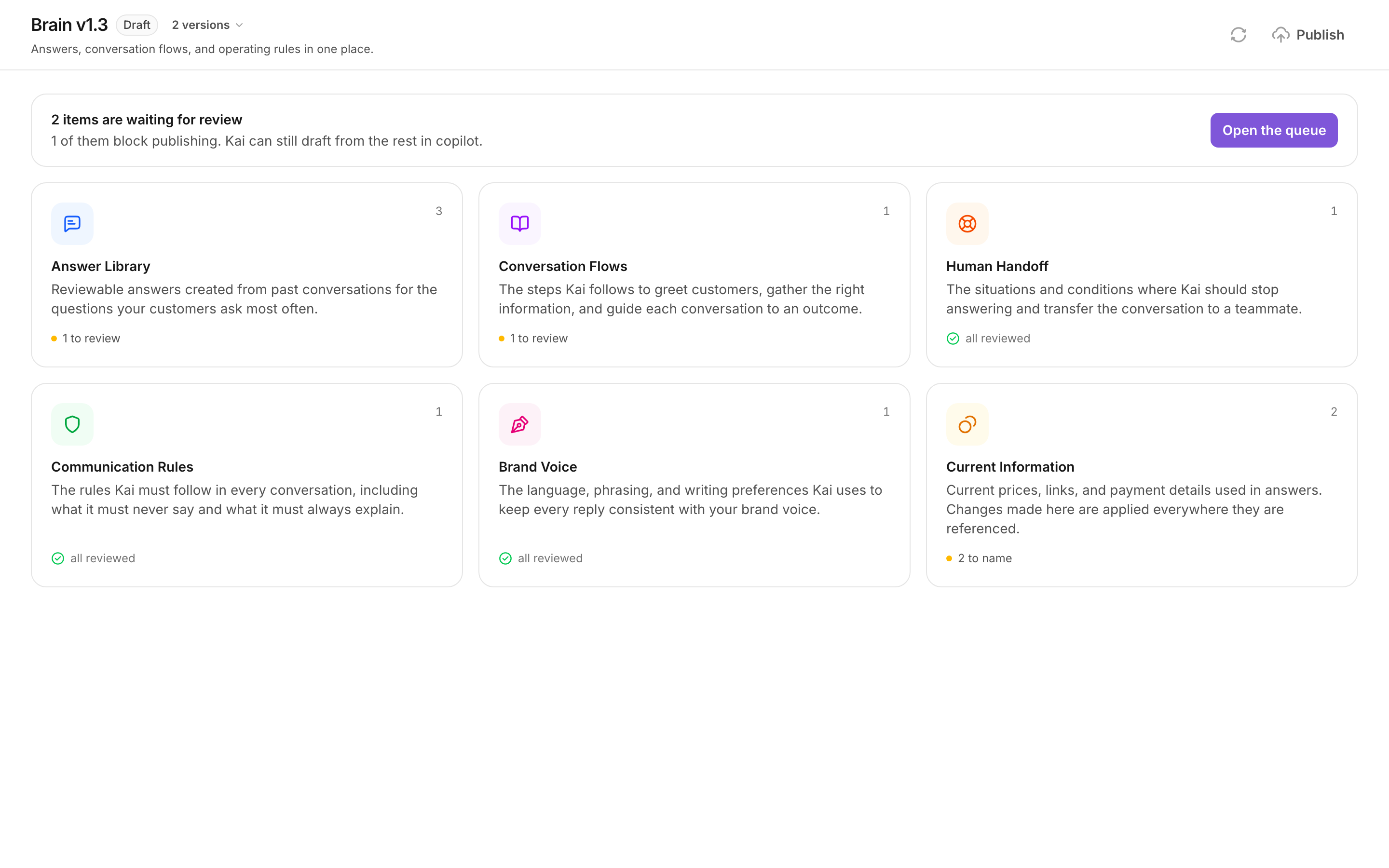 The **Answer Library** holds one entry per question your customers ask, with
the other ways they ask it. **Conversation Flows** hold the steps Kai follows
in a situation, such as a price request. **Human Handoff** holds the conditions
where Kai must stop. **Communication Rules** hold what Kai must never say.
**Brand Voice** holds the greetings, the sign-offs and the phrases to avoid.
**Current Information** holds the live values, such as a price or a payment
link.
**Current Information is not part of a Brain version.** If you change a price
there, the change applies to the next reply. It needs no review and no publish.
Everything else needs both.
## What happens to one live message
A customer writes. Kai does six things, in this order.
Customers send one thought across several short messages. Kai waits a fixed
number of seconds, 20 by default, and every new message pushes the wait
forward. If you switch on **Follow the customer's typing rhythm**, Kai
waits longer while messages still arrive in a burst.
Kai works out the intent and the language.
Kai retrieves the answers and the conversation flow that match the intent.
The reply uses only what the Brain holds. Kai does not answer from general
knowledge.
The checks are deterministic and run on the text Kai produced, not on its
intentions.
Kai replies, writes a draft, escalates to a teammate, or stays quiet.
The **Answer Library** holds one entry per question your customers ask, with
the other ways they ask it. **Conversation Flows** hold the steps Kai follows
in a situation, such as a price request. **Human Handoff** holds the conditions
where Kai must stop. **Communication Rules** hold what Kai must never say.
**Brand Voice** holds the greetings, the sign-offs and the phrases to avoid.
**Current Information** holds the live values, such as a price or a payment
link.
**Current Information is not part of a Brain version.** If you change a price
there, the change applies to the next reply. It needs no review and no publish.
Everything else needs both.
## What happens to one live message
A customer writes. Kai does six things, in this order.
Customers send one thought across several short messages. Kai waits a fixed
number of seconds, 20 by default, and every new message pushes the wait
forward. If you switch on **Follow the customer's typing rhythm**, Kai
waits longer while messages still arrive in a burst.
Kai works out the intent and the language.
Kai retrieves the answers and the conversation flow that match the intent.
The reply uses only what the Brain holds. Kai does not answer from general
knowledge.
The checks are deterministic and run on the text Kai produced, not on its
intentions.
Kai replies, writes a draft, escalates to a teammate, or stays quiet.
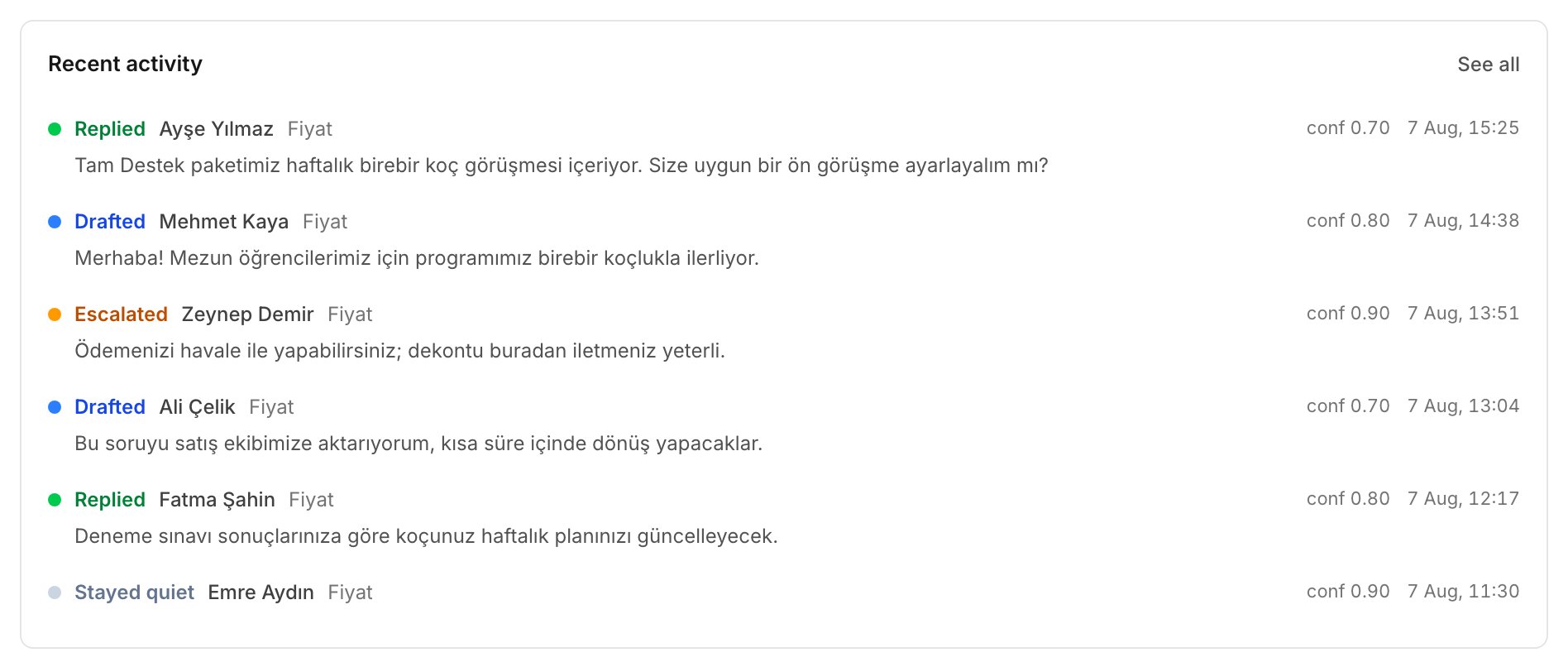 Each of the four outcomes is recorded. Open an action to see the conversation
flow, the answers and the checks behind it.
## The groundedness rule
A number in a reply must come from somewhere Kai can point to. It must appear
in one of three places:
* **Current Information**, which your team maintains;
* a **non-volatile answer** in the answer library, such as a lesson count;
* the **conversation itself**, where the customer or a teammate wrote it.
If a number is in none of the three, Kai downgrades the reply to a draft. A
human then reads it. This is why a price Kai cannot verify never reaches a
customer on its own.
The rule applies to numbers, not to sentences. A price is the case it was
built for. Keep your prices in **Current Information**, and a price answer
stays sendable.
## The takeover rule
When a human replies on a conversation, Kai stops acting on it. The
conversation stays with your team until they close it.
This holds on every channel. In Intercom, Kai reads which replies were typed in
the inbox by a person, and which were written by an app. A reply typed by a
teammate is a takeover. A reply written through an app is not.
The rule exists so that two voices never answer the same customer at the same
time. A conversation that a person owns stays owned by that person.
## Brain versions
A Brain has a version, such as `v1`. A channel is pinned to one published
version, and it answers from that version only.
**Publishing freezes a version.** After a publish, the version cannot be
edited. This is what makes an action traceable: the Brain that produced a reply
last month still exists, word for word.
To change a published Brain, use **Edit as a new draft**. Kai opens a copy and
carries your review decisions across. The published version keeps serving your
channels while you work on the copy. The copy is `v1.1`, then `v1.2`, and so
on. A new compile from a new import gives you `v2`.
### What blocks a publish
Publishing is blocked only by content that could reach a customer without a
person reading it:
* **Brand Voice**;
* every **Human Handoff** rule;
* every **Conversation Flow** that autopilot may use;
* the answers those flows use.
Anything else may stay unreviewed in a published Brain. Unreviewed content
never sends on its own. It drafts, a person reads it, and that is how the rest
of the queue gets reviewed from real traffic.
## Next
Do all of this once, from sign-up to the first draft.
The modes, the two autopilot scopes, and per-source settings.
Each of the four outcomes is recorded. Open an action to see the conversation
flow, the answers and the checks behind it.
## The groundedness rule
A number in a reply must come from somewhere Kai can point to. It must appear
in one of three places:
* **Current Information**, which your team maintains;
* a **non-volatile answer** in the answer library, such as a lesson count;
* the **conversation itself**, where the customer or a teammate wrote it.
If a number is in none of the three, Kai downgrades the reply to a draft. A
human then reads it. This is why a price Kai cannot verify never reaches a
customer on its own.
The rule applies to numbers, not to sentences. A price is the case it was
built for. Keep your prices in **Current Information**, and a price answer
stays sendable.
## The takeover rule
When a human replies on a conversation, Kai stops acting on it. The
conversation stays with your team until they close it.
This holds on every channel. In Intercom, Kai reads which replies were typed in
the inbox by a person, and which were written by an app. A reply typed by a
teammate is a takeover. A reply written through an app is not.
The rule exists so that two voices never answer the same customer at the same
time. A conversation that a person owns stays owned by that person.
## Brain versions
A Brain has a version, such as `v1`. A channel is pinned to one published
version, and it answers from that version only.
**Publishing freezes a version.** After a publish, the version cannot be
edited. This is what makes an action traceable: the Brain that produced a reply
last month still exists, word for word.
To change a published Brain, use **Edit as a new draft**. Kai opens a copy and
carries your review decisions across. The published version keeps serving your
channels while you work on the copy. The copy is `v1.1`, then `v1.2`, and so
on. A new compile from a new import gives you `v2`.
### What blocks a publish
Publishing is blocked only by content that could reach a customer without a
person reading it:
* **Brand Voice**;
* every **Human Handoff** rule;
* every **Conversation Flow** that autopilot may use;
* the answers those flows use.
Anything else may stay unreviewed in a published Brain. Unreviewed content
never sends on its own. It drafts, a person reads it, and that is how the rest
of the queue gets reviewed from real traffic.
## Next
Do all of this once, from sign-up to the first draft.
The modes, the two autopilot scopes, and per-source settings.