> ## Documentation Index
> Fetch the complete documentation index at: https://docs.kaisupport.com/llms.txt
> Use this file to discover all available pages before exploring further.
# Current information
> Prices, links and payment details live outside the Brain version, so a change takes effect on the next reply.
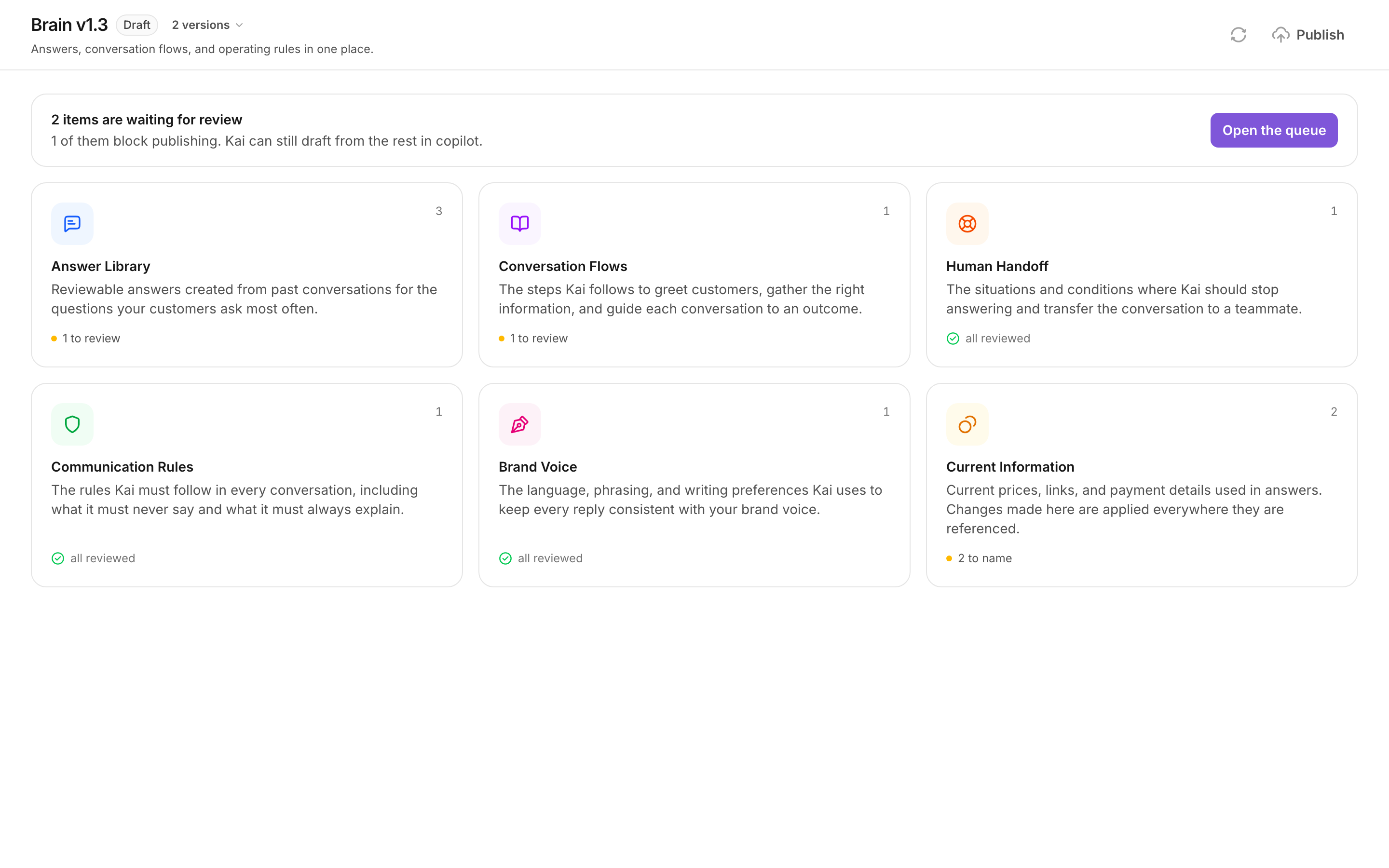
Current information is the register of values that change: prices, form links,
payment details, opening hours. It is the sixth category on the **Brain** page.
 ## Why it is separate
The other five categories are part of a Brain version. A version is frozen when
you publish it, so a change there needs a new draft, a review, and a publish.
A fact is not part of a version. **A change to a fact takes effect on the next
reply.** There is no review state, and there is no publish step.
A price change should not need a compile. Your prices change more often than
your answers do, and freezing them inside a published version would make every
price change a release.
## What a fact holds
| Part | What it is |
| --------------- | ---------------------------------------------------------------- |
| **Name** | What a teammate reads, for example `Payment IBAN`. |
| **Key** | The token an answer uses, lowercase, for example `payment_iban`. |
| **Value** | What the customer sees. |
| **Description** | One line on what the value is. Kai reads it too. |
| **Type** | Link, IBAN, Price or Text. |
The key cannot hold spaces. Kai lowercases it and replaces the rest.
## How an answer uses a fact
An answer never carries the value. It carries a token:
```text theme={null}
Ödeme için IBAN: {{fact:payment_iban}}
```
Kai fills the token in after it writes the reply, not while it writes it. This
matters for two types:
* A **Link** and an **IBAN** never enter the prompt at all. Kai only ever sees
the token, and the runtime substitutes the exact value.
* A **Price** and a **Text** fact are shown to Kai as live data, so Kai can
reason with the number, and the value is still substituted exactly.
An IBAN with one wrong digit sends a customer's money to a stranger. A URL with
one wrong character returns a 404. Copying is not a task worth trusting to a
model when replacement is exact.
If a token names a fact that does not exist, the reply is downgraded to a
draft. A customer must never receive a raw token.
## Placeholders waiting for a name
Kai replaces every phone number, email address, link and payment reference with
a placeholder before any model reads your history. A placeholder looks like
`[URL_13]` or `[IBAN_2]`.
When the compiler produced an answer that mentions one, the answer cannot be
sent until you say what the placeholder is. The Brain page counts these as
**to name**, and Current Information lists them under **Placeholders from your
history**.
Each row shows the placeholder, how many answers mention it, and an excerpt
of one of them, so you can see what the value was used for.
Select **Suggest names**. Kai reads where each placeholder appears and
proposes a name, a description and a type. Where the import still holds the
original value on this machine, Kai fills that in too. Nothing is saved yet.
Select **Name this** on a row. Check every field, correct the value, and
select **Save**.
Kai states how many mentions it rewrote across the Brain. Every answer that
used the placeholder now uses the fact.
Naming a placeholder rewrites the Brain, so it needs an editable draft. On a
published version the list is read-only. Select **Edit as a new draft** first.
## How this meets the groundedness rule
Kai checks its own output before it sends. A number in a reply must appear in
one of three places:
1. a fact in current information;
2. an answer that is not marked as changing over time;
3. the conversation itself, because a customer's own number is safe to repeat.
If a number appears in none of them, Kai does not send the reply. It writes a
draft for a human instead. The check is on the finished text, not on the prompt.
The check treats a number as a price when it is 100 or larger, or when a
currency or percent marker stands next to it. Small numbers such as a grade
level or a step number are not checked.
A reply that quotes a price and is always downgraded to a draft usually means
the price is written inside an answer as plain text. Move it to a fact, and
put the token in the answer.
## When to use a fact instead of an answer
Use a fact when:
* the value changes on its own schedule: a price, a discount, an instalment
count;
* the value must be exact: an IBAN, a link, a reference number;
* the value appears in more than one answer, and all of them must agree.
Keep it in the answer when:
* the number is part of the explanation and never changes, for example how many
coaching sessions a week the programme has;
* the number belongs to one answer only and is not money.
## Maintaining the register
* **Edit** changes the value everywhere it is used, on the next reply.
* **Delete** removes the fact. Any answer that still names it will be
downgraded to a draft, so search the Answer Library first.
* The list is grouped by type, so twenty facts read as four short lists.
## Next
The other five categories, and what a review state means.
What publishing freezes, and what it does not.
## Why it is separate
The other five categories are part of a Brain version. A version is frozen when
you publish it, so a change there needs a new draft, a review, and a publish.
A fact is not part of a version. **A change to a fact takes effect on the next
reply.** There is no review state, and there is no publish step.
A price change should not need a compile. Your prices change more often than
your answers do, and freezing them inside a published version would make every
price change a release.
## What a fact holds
| Part | What it is |
| --------------- | ---------------------------------------------------------------- |
| **Name** | What a teammate reads, for example `Payment IBAN`. |
| **Key** | The token an answer uses, lowercase, for example `payment_iban`. |
| **Value** | What the customer sees. |
| **Description** | One line on what the value is. Kai reads it too. |
| **Type** | Link, IBAN, Price or Text. |
The key cannot hold spaces. Kai lowercases it and replaces the rest.
## How an answer uses a fact
An answer never carries the value. It carries a token:
```text theme={null}
Ödeme için IBAN: {{fact:payment_iban}}
```
Kai fills the token in after it writes the reply, not while it writes it. This
matters for two types:
* A **Link** and an **IBAN** never enter the prompt at all. Kai only ever sees
the token, and the runtime substitutes the exact value.
* A **Price** and a **Text** fact are shown to Kai as live data, so Kai can
reason with the number, and the value is still substituted exactly.
An IBAN with one wrong digit sends a customer's money to a stranger. A URL with
one wrong character returns a 404. Copying is not a task worth trusting to a
model when replacement is exact.
If a token names a fact that does not exist, the reply is downgraded to a
draft. A customer must never receive a raw token.
## Placeholders waiting for a name
Kai replaces every phone number, email address, link and payment reference with
a placeholder before any model reads your history. A placeholder looks like
`[URL_13]` or `[IBAN_2]`.
When the compiler produced an answer that mentions one, the answer cannot be
sent until you say what the placeholder is. The Brain page counts these as
**to name**, and Current Information lists them under **Placeholders from your
history**.
Each row shows the placeholder, how many answers mention it, and an excerpt
of one of them, so you can see what the value was used for.
Select **Suggest names**. Kai reads where each placeholder appears and
proposes a name, a description and a type. Where the import still holds the
original value on this machine, Kai fills that in too. Nothing is saved yet.
Select **Name this** on a row. Check every field, correct the value, and
select **Save**.
Kai states how many mentions it rewrote across the Brain. Every answer that
used the placeholder now uses the fact.
Naming a placeholder rewrites the Brain, so it needs an editable draft. On a
published version the list is read-only. Select **Edit as a new draft** first.
## How this meets the groundedness rule
Kai checks its own output before it sends. A number in a reply must appear in
one of three places:
1. a fact in current information;
2. an answer that is not marked as changing over time;
3. the conversation itself, because a customer's own number is safe to repeat.
If a number appears in none of them, Kai does not send the reply. It writes a
draft for a human instead. The check is on the finished text, not on the prompt.
The check treats a number as a price when it is 100 or larger, or when a
currency or percent marker stands next to it. Small numbers such as a grade
level or a step number are not checked.
A reply that quotes a price and is always downgraded to a draft usually means
the price is written inside an answer as plain text. Move it to a fact, and
put the token in the answer.
## When to use a fact instead of an answer
Use a fact when:
* the value changes on its own schedule: a price, a discount, an instalment
count;
* the value must be exact: an IBAN, a link, a reference number;
* the value appears in more than one answer, and all of them must agree.
Keep it in the answer when:
* the number is part of the explanation and never changes, for example how many
coaching sessions a week the programme has;
* the number belongs to one answer only and is not money.
## Maintaining the register
* **Edit** changes the value everywhere it is used, on the next reply.
* **Delete** removes the fact. Any answer that still names it will be
downgraded to a draft, so search the Answer Library first.
* The list is grouped by type, so twenty facts read as four short lists.
## Next
The other five categories, and what a review state means.
What publishing freezes, and what it does not.