> ## Documentation Index
> Fetch the complete documentation index at: https://docs.kaisupport.com/llms.txt
> Use this file to discover all available pages before exploring further.
# Contacts and account owners
> The customer record behind every conversation, and the teammate who owns the account.
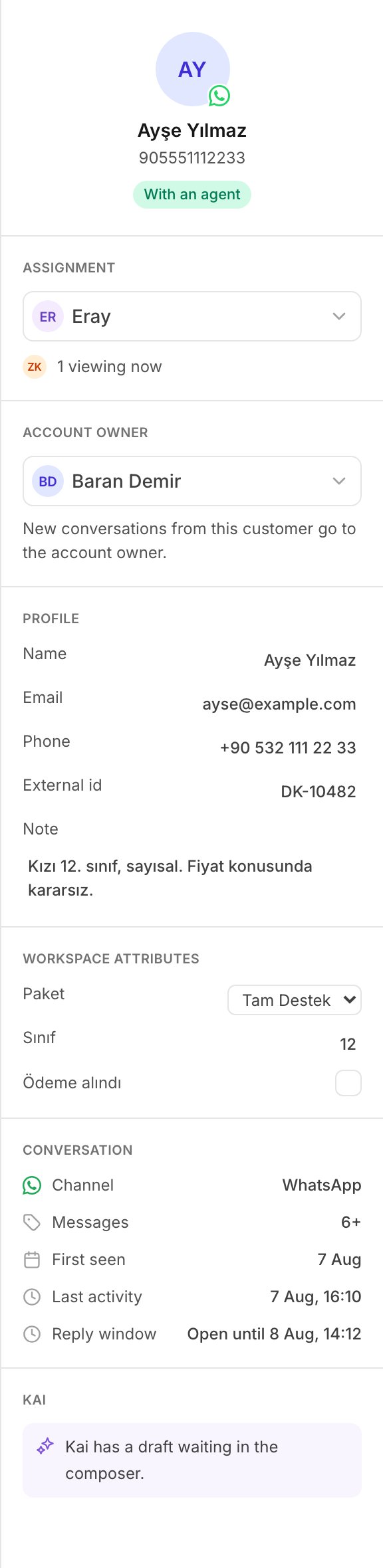
A contact is one customer. The **Contacts** screen holds every customer this
workspace knows, and the teammate who owns each account.
The same record shows in the right panel of the inbox, beside the
conversation.
 ## Where a contact comes from
There are two sources, and they write the same records.
**A customer writes to you.** Kai makes a contact the first time a
conversation arrives from a person it does not know. The contact holds the
channel handle as an identity, and the name the channel reported. The
conversation links to it.
**You push a contact.** Your CRM, your billing system or a spreadsheet writes
it through the Contacts API. See [Contacts](/concepts/contacts).
A customer who writes to you after you pushed their phone number lands on the
contact you pushed. The record is one record.
## The Contacts screen
The list carries a search box and three filters.
| Control | What it does |
| ------------ | ----------------------------------------- |
| Search | Reads name, email, phone and your own id. |
| **All** | Every contact. |
| **Mine** | The contacts you own. |
| **No owner** | The contacts nobody owns. |
Select a contact to open its record on the right. Select **Load more** at the
end of a long list.
Until the first message arrives, the list says: *No contacts yet. They arrive
with the first message, or through the API.*
## The contact record
The record has four parts.
### Account owner
The teammate who owns this customer. See below.
### Profile
**Name**, **Email**, **Phone**, **External id** and **Note**.
Every value is edited in place. Select it, type, then press `Enter` or leave
the box. There is no save button, because a rep updates one detail in the
middle of a conversation.
The note is free text for teammates. Kai does not send it to a customer, and
does not give it to the model that writes replies.
### Workspace attributes
Your own data on the customer: the package they bought, their exam year, their
plan. See [Attributes](#workspace-attributes) below.
### Conversations
Every conversation of this customer, with its last activity. Select one to
open it in the inbox.
An Agent may read and edit a contact, because the person who talks to a
customer is the person who learns their details. Only an Admin or a Manager
sets the account owner: that decision routes work between teammates. A
teammate without the permission sees *You can read contacts but not change
them.*
## Identities
An identity is one handle of one customer: an email address, a phone number,
an id from your own system, a contact id from the channel.
Kai stores identities normalized, so the same person written two ways is one
person:
* an email address is lower cased;
* a phone number keeps its digits only, and loses a leading `00`.
WhatsApp's `905321112233` and a CRM's `+90 532 111 22 33` are therefore the
same identity.
**Kai matches, it never merges.** Matching is exact, on the handle. There is
no matching by name similarity anywhere in Kai. When a write names two
identities that point at two different contacts, Kai refuses the write and
tells you. A duplicate contact can be fixed. A wrong merge puts one
customer's history in front of another, and it cannot be undone.
See [Identity](/concepts/identity) for the API side.
## Workspace attributes
An attribute has two halves: a definition, and a value.
The **definition** is the vocabulary of your workspace. It lives in
**Settings**, under **Attributes**: a key, a name and a type. Add one there,
and your team can fill it without a change to Kai.
The **value** sits on the contact.
Three rules:
* Kai refuses a key that the workspace does not define. A push of 3000 rows
must not silently drop the one attribute you cared about.
* The type of a definition never changes. Make a new attribute instead.
* Delete means archive. An archived attribute keeps every value it holds, and
nobody can edit it after that.
Until you define one, the record says: *No workspace attributes yet. Add them
in Settings.*
See [Attributes](/concepts/attributes) for the API side.
## The account owner
The account owner is the teammate who owns a customer. One contact has one
owner, or none.
The owner does two things:
* Kai shows the owner on the contact record and beside the conversation, so
every teammate knows who holds the relationship.
* Kai assigns a new conversation from that customer to the owner. The record
says so: *New conversations from this customer go to the account owner.*
### Ownership routes new work only
Kai assigns a conversation one time, while the conversation is still
unassigned.
This is what keeps ownership safe. It never takes a thread back from the
teammate a manager gave it to, and it never moves work that somebody is
already doing.
Two things are worth knowing:
* If you change the owner from the contact record, the open conversations of
that customer move to the new owner. You made that decision on purpose, on
one customer.
* If the owner leaves the workspace, the contact loses its owner, and new
conversations go to the shared queue. Kai does not hold a conversation for a
person who left.
Closed and archived conversations never move. They are history, and history
records who answered.
Through the Contacts API the default is the opposite: an ownership write
does not move open conversations unless it asks to. A nightly sync that
restates 4000 unchanged owners must not reassign the whole inbox every
night. See [Account owners](/concepts/account-owners).
## Next
Assignment, the details panel, and the reply window.
Push, update, assign and export the same records.
## Where a contact comes from
There are two sources, and they write the same records.
**A customer writes to you.** Kai makes a contact the first time a
conversation arrives from a person it does not know. The contact holds the
channel handle as an identity, and the name the channel reported. The
conversation links to it.
**You push a contact.** Your CRM, your billing system or a spreadsheet writes
it through the Contacts API. See [Contacts](/concepts/contacts).
A customer who writes to you after you pushed their phone number lands on the
contact you pushed. The record is one record.
## The Contacts screen
The list carries a search box and three filters.
| Control | What it does |
| ------------ | ----------------------------------------- |
| Search | Reads name, email, phone and your own id. |
| **All** | Every contact. |
| **Mine** | The contacts you own. |
| **No owner** | The contacts nobody owns. |
Select a contact to open its record on the right. Select **Load more** at the
end of a long list.
Until the first message arrives, the list says: *No contacts yet. They arrive
with the first message, or through the API.*
## The contact record
The record has four parts.
### Account owner
The teammate who owns this customer. See below.
### Profile
**Name**, **Email**, **Phone**, **External id** and **Note**.
Every value is edited in place. Select it, type, then press `Enter` or leave
the box. There is no save button, because a rep updates one detail in the
middle of a conversation.
The note is free text for teammates. Kai does not send it to a customer, and
does not give it to the model that writes replies.
### Workspace attributes
Your own data on the customer: the package they bought, their exam year, their
plan. See [Attributes](#workspace-attributes) below.
### Conversations
Every conversation of this customer, with its last activity. Select one to
open it in the inbox.
An Agent may read and edit a contact, because the person who talks to a
customer is the person who learns their details. Only an Admin or a Manager
sets the account owner: that decision routes work between teammates. A
teammate without the permission sees *You can read contacts but not change
them.*
## Identities
An identity is one handle of one customer: an email address, a phone number,
an id from your own system, a contact id from the channel.
Kai stores identities normalized, so the same person written two ways is one
person:
* an email address is lower cased;
* a phone number keeps its digits only, and loses a leading `00`.
WhatsApp's `905321112233` and a CRM's `+90 532 111 22 33` are therefore the
same identity.
**Kai matches, it never merges.** Matching is exact, on the handle. There is
no matching by name similarity anywhere in Kai. When a write names two
identities that point at two different contacts, Kai refuses the write and
tells you. A duplicate contact can be fixed. A wrong merge puts one
customer's history in front of another, and it cannot be undone.
See [Identity](/concepts/identity) for the API side.
## Workspace attributes
An attribute has two halves: a definition, and a value.
The **definition** is the vocabulary of your workspace. It lives in
**Settings**, under **Attributes**: a key, a name and a type. Add one there,
and your team can fill it without a change to Kai.
The **value** sits on the contact.
Three rules:
* Kai refuses a key that the workspace does not define. A push of 3000 rows
must not silently drop the one attribute you cared about.
* The type of a definition never changes. Make a new attribute instead.
* Delete means archive. An archived attribute keeps every value it holds, and
nobody can edit it after that.
Until you define one, the record says: *No workspace attributes yet. Add them
in Settings.*
See [Attributes](/concepts/attributes) for the API side.
## The account owner
The account owner is the teammate who owns a customer. One contact has one
owner, or none.
The owner does two things:
* Kai shows the owner on the contact record and beside the conversation, so
every teammate knows who holds the relationship.
* Kai assigns a new conversation from that customer to the owner. The record
says so: *New conversations from this customer go to the account owner.*
### Ownership routes new work only
Kai assigns a conversation one time, while the conversation is still
unassigned.
This is what keeps ownership safe. It never takes a thread back from the
teammate a manager gave it to, and it never moves work that somebody is
already doing.
Two things are worth knowing:
* If you change the owner from the contact record, the open conversations of
that customer move to the new owner. You made that decision on purpose, on
one customer.
* If the owner leaves the workspace, the contact loses its owner, and new
conversations go to the shared queue. Kai does not hold a conversation for a
person who left.
Closed and archived conversations never move. They are history, and history
records who answered.
Through the Contacts API the default is the opposite: an ownership write
does not move open conversations unless it asks to. A nightly sync that
restates 4000 unchanged owners must not reassign the whole inbox every
night. See [Account owners](/concepts/account-owners).
## Next
Assignment, the details panel, and the reply window.
Push, update, assign and export the same records.