> ## Documentation Index
> Fetch the complete documentation index at: https://docs.kaisupport.com/llms.txt
> Use this file to discover all available pages before exploring further.
# Best practices
> Ten rules for the first weeks with Kai, and the reason behind each one.
This page is opinionated on purpose. Each rule is short, and the paragraph
under it says why. Read it in your first week, then again after your first
retrain.
## Start in copilot, and stay there
Run every channel in copilot until draft acceptance is steady. A draft costs
you a read. A wrong autopilot reply costs you a customer, and you find out
about it later.
Copilot also produces the only evidence that autopilot is safe. Every draft
your team sends unchanged is a vote that the answer behind it works. Watch
draft acceptance on the Overview page for two or three weeks. When it holds
steady and high, you have a number, not a feeling.
## Review the blockers first, not the longest list
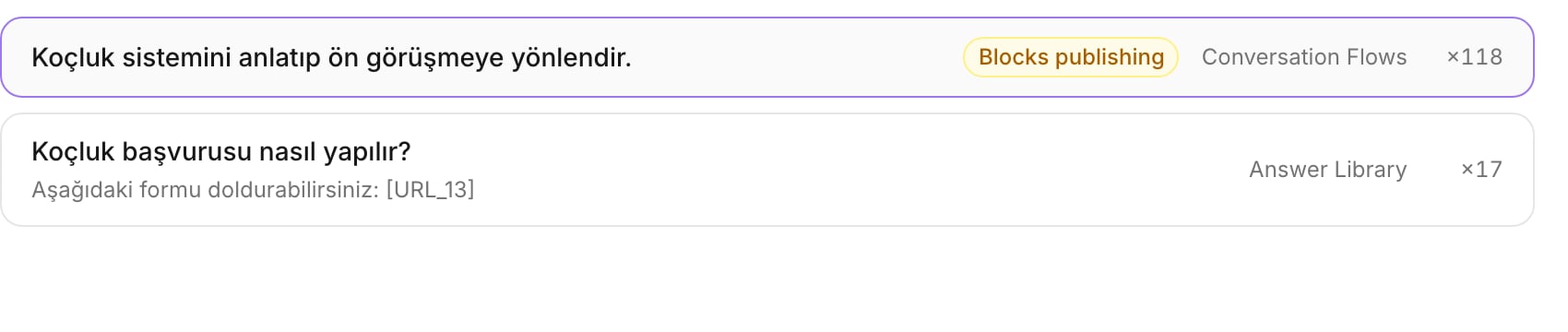
The review queue marks some items **Blocks publishing**. Start there. The
answer library is usually the longest category, and it is rarely the one
stopping you.
Publishing is blocked only by what could reach a customer with nobody reading
it: your brand voice, every human handoff rule, every conversation flow that
autopilot may use, and the answers those flows use. Everything else is allowed
into a published Brain, and it drafts instead. Reviewing the tail from real
traffic is faster than reviewing it from a list, and it is better ordered,
because the questions customers actually ask come up first.
 ## Write answers that hold no numbers
Keep a price, a fee, a date and a discount out of the answer library. Put them
in current information, and let the answer point at them.
Kai checks every number in a reply against current information, a non-volatile
answer, or the conversation itself. A number it cannot verify downgrades the
reply to a draft. An answer with a price baked into its text therefore drafts
forever, and worse, it goes stale the day the price changes and nobody
remembers which entry held it. Current information is not part of a Brain
version: change a price there and the next reply uses it, with no review and no
publish.
## Keep conversation flows short
Three or four steps is a flow. Twelve steps is a script, and a customer will
leave it at step two.
A flow tells Kai what to do in a situation, not what to say word by word. The
brand voice supplies the wording, and the answer library supplies the facts. A
long flow mostly repeats those two, and every repeated sentence is one more
thing to keep in agreement when a price or a policy changes.
## Write handoff rules for the expensive mistakes
List the cases where being wrong costs you money, trust or a legal problem.
Refunds, complaints, anything a lawyer would read, anything a parent is angry
about. Those are human handoff rules.
Kai stops on a handoff rule whatever else the policy says, and whatever its
confidence is. That makes the rule the cheapest control you own: one sentence
that a hundred edge cases cannot get past. Write the rules broadly. A handoff
that was not needed costs one teammate one minute.
## Rate the drafts
Rate what Kai already said, in the console's Review mode. Mark a reply good, or
write the correction you would have sent.
A rating is the only thing that lets a live reply teach the next Brain. Kai
never learns from its own unreviewed output: an AI reply enters the corpus only
when a reviewer rated it good or wrote a correction, and the correction
replaces the words Kai used. An unrated reply is discarded at retrain time. If
your team rates nothing, a retrain learns nothing from the months you ran.
## Move one source to autopilot, not a whole channel
When you do switch on autopilot, switch on one source. One Intercom workspace
carries the Messenger widget, WhatsApp, email and SMS on one connection, and
those are not one audience.
A widget visitor is often anonymous and asks anything. A WhatsApp thread is a
phone number that already chose to write to you, usually about one thing. Start
with the narrower audience, watch the activity feed for a week, then widen. A
per-source mode is one control on the channel card, so this costs you nothing.
## Retrain on a schedule, not after a complaint
Put a retrain in the calendar: monthly, or after a season ends. Do not run one
because a reply went wrong yesterday.
One bad reply is a review job, not a retrain. Edit the answer, approve it,
publish. A retrain rebuilds the whole Brain, and it needs the reviews to be in
before it runs, or it carries the same gaps forward. Scheduled retrains also
cost less: labels are cached per conversation, so a retrain over a mostly
unchanged history pays only for what is new.
## Never approve an answer you would not send
Approve means "a customer may read this". If you would rewrite it before
sending, edit it now, or reject it.
Approving is what lets an answer reach a customer with nobody watching, under
the **Anything a reviewer approved** scope. An approval given to clear a queue
is not a review, and it removes the one gate that stands between a draft answer
and a live one. Rejecting is cheap. The topic stays known, and Kai escalates it
instead of guessing.
## Give the account owner to the person who knows the customer
Set the account owner to the teammate who has actually spoken to that customer,
not to whoever is free.
The owner is how the next conversation from that customer reaches the same
person, so the customer does not explain everything again. Kai assigns a new
conversation to the owner only while it is unassigned, so ownership never takes
a thread away from the teammate a manager handed it to.
## Next
The modes, the two autopilot scopes, and per-source settings.
Every term on one page.
## Write answers that hold no numbers
Keep a price, a fee, a date and a discount out of the answer library. Put them
in current information, and let the answer point at them.
Kai checks every number in a reply against current information, a non-volatile
answer, or the conversation itself. A number it cannot verify downgrades the
reply to a draft. An answer with a price baked into its text therefore drafts
forever, and worse, it goes stale the day the price changes and nobody
remembers which entry held it. Current information is not part of a Brain
version: change a price there and the next reply uses it, with no review and no
publish.
## Keep conversation flows short
Three or four steps is a flow. Twelve steps is a script, and a customer will
leave it at step two.
A flow tells Kai what to do in a situation, not what to say word by word. The
brand voice supplies the wording, and the answer library supplies the facts. A
long flow mostly repeats those two, and every repeated sentence is one more
thing to keep in agreement when a price or a policy changes.
## Write handoff rules for the expensive mistakes
List the cases where being wrong costs you money, trust or a legal problem.
Refunds, complaints, anything a lawyer would read, anything a parent is angry
about. Those are human handoff rules.
Kai stops on a handoff rule whatever else the policy says, and whatever its
confidence is. That makes the rule the cheapest control you own: one sentence
that a hundred edge cases cannot get past. Write the rules broadly. A handoff
that was not needed costs one teammate one minute.
## Rate the drafts
Rate what Kai already said, in the console's Review mode. Mark a reply good, or
write the correction you would have sent.
A rating is the only thing that lets a live reply teach the next Brain. Kai
never learns from its own unreviewed output: an AI reply enters the corpus only
when a reviewer rated it good or wrote a correction, and the correction
replaces the words Kai used. An unrated reply is discarded at retrain time. If
your team rates nothing, a retrain learns nothing from the months you ran.
## Move one source to autopilot, not a whole channel
When you do switch on autopilot, switch on one source. One Intercom workspace
carries the Messenger widget, WhatsApp, email and SMS on one connection, and
those are not one audience.
A widget visitor is often anonymous and asks anything. A WhatsApp thread is a
phone number that already chose to write to you, usually about one thing. Start
with the narrower audience, watch the activity feed for a week, then widen. A
per-source mode is one control on the channel card, so this costs you nothing.
## Retrain on a schedule, not after a complaint
Put a retrain in the calendar: monthly, or after a season ends. Do not run one
because a reply went wrong yesterday.
One bad reply is a review job, not a retrain. Edit the answer, approve it,
publish. A retrain rebuilds the whole Brain, and it needs the reviews to be in
before it runs, or it carries the same gaps forward. Scheduled retrains also
cost less: labels are cached per conversation, so a retrain over a mostly
unchanged history pays only for what is new.
## Never approve an answer you would not send
Approve means "a customer may read this". If you would rewrite it before
sending, edit it now, or reject it.
Approving is what lets an answer reach a customer with nobody watching, under
the **Anything a reviewer approved** scope. An approval given to clear a queue
is not a review, and it removes the one gate that stands between a draft answer
and a live one. Rejecting is cheap. The topic stays known, and Kai escalates it
instead of guessing.
## Give the account owner to the person who knows the customer
Set the account owner to the teammate who has actually spoken to that customer,
not to whoever is free.
The owner is how the next conversation from that customer reaches the same
person, so the customer does not explain everything again. Kai assigns a new
conversation to the owner only while it is unassigned, so ownership never takes
a thread away from the teammate a manager handed it to.
## Next
The modes, the two autopilot scopes, and per-source settings.
Every term on one page.