> ## Documentation Index
> Fetch the complete documentation index at: https://docs.kaisupport.com/llms.txt
> Use this file to discover all available pages before exploring further.
# Ask Kai a question
> Find your team's answer to a question, with its sources, before you write to a customer.
Read this page to learn how to get your team's answer to a question without
asking a colleague.
## What Ask is for
The console is the screen where you work on Kai instead of with it. It has
several modes, and an Agent holds one: **Ask**. A mode you cannot use is not
shown to you, so for most agents the console is one screen.
 Use Ask when a customer asks something you have not answered before, and you
want to know what your team's answer is. It is faster than asking a colleague,
and it gives the same answer every time.
Open the console and select **Ask**. The screen greets you with
**What do you want to know?**. Write your question in the box, which reads
**Ask about anything in the knowledge base…**.
Ask needs a compiled Brain. Without one the console says: *There is no
compiled Brain yet, so there is nothing to ask about. Import a chat export
first.*
## Where the answers come from
Answers come only from your compiled Brain: the answer library, the
conversation flows and the brand voice your workspace reviewed. Kai does not
answer from general knowledge, and it does not search the internet. The console
says so under the box: *Answers come only from your compiled Brain, never
general knowledge.*
Each answer carries a **Sources** list. Select a source to open the entry it
came from, with its variants and the past conversations behind it.
Use Ask when a customer asks something you have not answered before, and you
want to know what your team's answer is. It is faster than asking a colleague,
and it gives the same answer every time.
Open the console and select **Ask**. The screen greets you with
**What do you want to know?**. Write your question in the box, which reads
**Ask about anything in the knowledge base…**.
Ask needs a compiled Brain. Without one the console says: *There is no
compiled Brain yet, so there is nothing to ask about. Import a chat export
first.*
## Where the answers come from
Answers come only from your compiled Brain: the answer library, the
conversation flows and the brand voice your workspace reviewed. Kai does not
answer from general knowledge, and it does not search the internet. The console
says so under the box: *Answers come only from your compiled Brain, never
general knowledge.*
Each answer carries a **Sources** list. Select a source to open the entry it
came from, with its variants and the past conversations behind it.
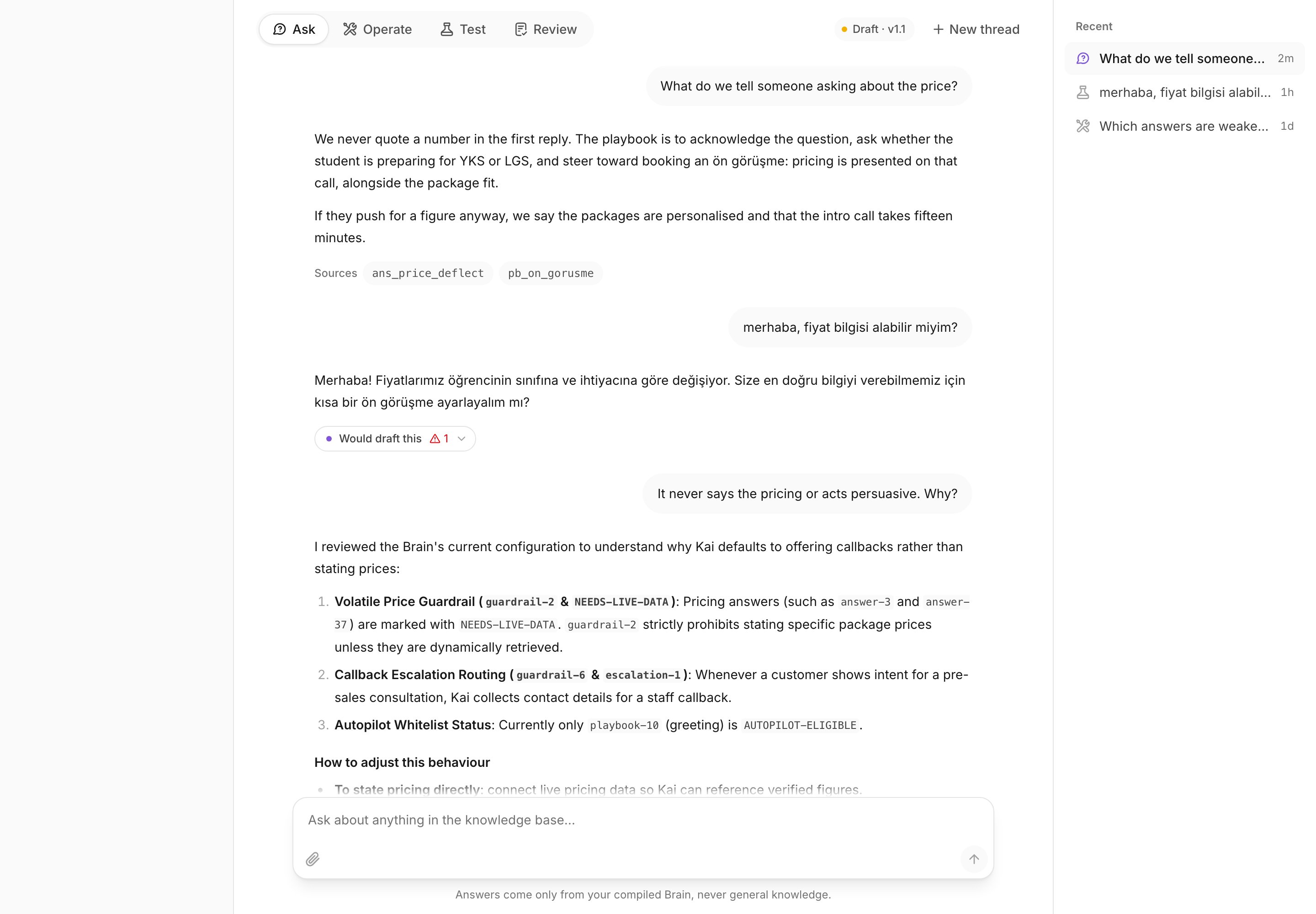 A source you cannot open is not evidence. If the model names an entry that
does not exist, Kai drops it instead of showing a chip that leads nowhere.
Everything under **Sources** is real, and you can read all of it.
Read the source, not only the answer. The entry shows how your team really
phrased this, in past conversations, which is what you want in front of you
while you write your own reply.
## Three questions worth asking
**A price question.**
> What do we tell someone asking about the price?
Kai answers with your team's canonical answer, and lists the answer library
entries under **Sources**. Open one to see the wording your colleagues used.
**A policy question.**
> What is our answer for gap-year students?
Use this shape for any group or case with a rule behind it. If the Brain has no
answer for it, say so to your manager: a question customers ask and the Brain
cannot answer is a gap worth closing.
**A question about a named person.**
> How do we handle a parent who wants to talk to a specific person?
Customers often ask for one colleague by name. Kai answers with the flow your
team follows, so you deflect the same way everybody else does, instead of
promising a call nobody can hold.
## When Ask is the wrong tool
**Ask does not know this customer.** It reads the Brain, not the conversation
in front of you. For a reply written for this thread, use the sparkle button in
the composer instead. See
[Send a Kai draft](/product/agent/send-a-kai-draft).
**Ask cannot change an answer.** Nothing you write here reaches the Brain. If
the answer Ask gives you is wrong or out of date, do not correct it here, and
do not send it to the customer. Report it to whoever reviews the Brain, and
give them the question you asked and the source you opened.
For the other console modes and who holds them, see
[The console](/product/console).
## Practice
1. Open the console, then write: *What do we tell someone asking about the
price?*
2. Open one entry under **Sources** and read the past conversations behind it.
3. Ask the last question a customer asked you that you had to check with a
colleague. Compare the answer with what your colleague said.
You have finished the series. Go back to
[Kai for support agents](/product/agent) for the whole path, or read
[Working with Kai's drafts](/product/drafts) for every control on the draft
card.
A source you cannot open is not evidence. If the model names an entry that
does not exist, Kai drops it instead of showing a chip that leads nowhere.
Everything under **Sources** is real, and you can read all of it.
Read the source, not only the answer. The entry shows how your team really
phrased this, in past conversations, which is what you want in front of you
while you write your own reply.
## Three questions worth asking
**A price question.**
> What do we tell someone asking about the price?
Kai answers with your team's canonical answer, and lists the answer library
entries under **Sources**. Open one to see the wording your colleagues used.
**A policy question.**
> What is our answer for gap-year students?
Use this shape for any group or case with a rule behind it. If the Brain has no
answer for it, say so to your manager: a question customers ask and the Brain
cannot answer is a gap worth closing.
**A question about a named person.**
> How do we handle a parent who wants to talk to a specific person?
Customers often ask for one colleague by name. Kai answers with the flow your
team follows, so you deflect the same way everybody else does, instead of
promising a call nobody can hold.
## When Ask is the wrong tool
**Ask does not know this customer.** It reads the Brain, not the conversation
in front of you. For a reply written for this thread, use the sparkle button in
the composer instead. See
[Send a Kai draft](/product/agent/send-a-kai-draft).
**Ask cannot change an answer.** Nothing you write here reaches the Brain. If
the answer Ask gives you is wrong or out of date, do not correct it here, and
do not send it to the customer. Report it to whoever reviews the Brain, and
give them the question you asked and the source you opened.
For the other console modes and who holds them, see
[The console](/product/console).
## Practice
1. Open the console, then write: *What do we tell someone asking about the
price?*
2. Open one entry under **Sources** and read the past conversations behind it.
3. Ask the last question a customer asked you that you had to check with a
colleague. Compare the answer with what your colleague said.
You have finished the series. Go back to
[Kai for support agents](/product/agent) for the whole path, or read
[Working with Kai's drafts](/product/drafts) for every control on the draft
card.